





OnyX OSX Utility
 Most of the time OS X runs well without much intervention. However there are times when you want to do some cleaning, run automated maintenance at unusual times, or change settings that aren’t readily accessible from the user interface. Since OS X is based on a form of Unix, all of these things can be accomplished at the command line. However for most people, the command line isn’t very friendly. Not only is it hard to find the right command, but it can be very easy to make mistakes. OnyX solves many of these issues by giving you a clean interface to many of OS X’s internals. (more…)
Why I won’t buy an Intel Mac (yet)
 A farmer and his wife visited the fair each year. One of the attractions was a pilot who would give passengers a short ride in his bi-plane for five dollars. The farmer wanted to ride the plane, but every year his wife would say, “five dollars is five dollars”. After 7 years, the pilot offered the farmer a deal. He said, “If you and your wife can go the entire ride without making a sound I’ll give the the ride for free.” The farmer and his wife were delighted with this offer and climbed aboard.
Hacking Quicken to Import QFX Files on OS X
 Intuit is not a Mac friendly company. They make an OS X version of Quicken, but it is artificially crippled in order to try to get banks to pay them money. Intuit will only let you import files from banks that pay extra to let their customers download transactions into Quicken for Mac. The fact that you paid for Quicken and the bank paid for a Quicken server isn’t enough. They want the banks to pay another fee for their Mac users–even though there is no additional hardware or software involved. The end result is that Mac users get a product that will only work with a handful of banks. This article discusses a method to get around this limitation. (more…)
TiVo vs. Windows Media Center
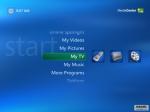
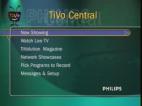 There are two basic ways to enter the world of the Personal Video Recorder (PVR): through a dedicated hardware unit, like a TiVo or ReplayTV, or through a software-based PVR that runs on your home computer, like Windows: Media Center Edition (WMCE) or MythTV. In this article I will compare the most popular form of each platform, TiVo and WMCE, to help you figure out which one would be best for you. (more…)
Travelling with Movies on a Mac
 There are several situations where you might want to dump a DVD to your hard drive to watch later. For instance, I get significantly better battery life when watching a video from my hard drive than I get when watching it from a DVD. If I’m stuck in a plane for several hours, having my movie on the hard drive can be the difference between finishing the show, or running out of power halfway through. I use a PowerBook and in OS X 10.3 and earlier you could just use the built in Disk Utility to copy a DVD to your disk, but it stopped working in 10.4. However with a few free tools you can accomplish the same thing and more.
(more…)
Keeping a Hot Backup of Your Mac Hard Drive
Special Note: Our companion site is running a free iPod giveaway. Signup for a chance to win!
 You don’t really understand the importance of backups until your hard drive crashes. With most backups, you’ll need to reinstall the operating system and then restore all of your data. OS X comes with a handy tool that will let you create a live copy of your hard drive that can be started up and run just like it is your computer. (more…)
