





Remote Signaling System for Your Home
 Picture this: you are working in your home office, maybe in the basement or on 2nd floor, your wife (or husband) is cooking dinner, and the kids are screaming, but you are oblivious to it. Maybe you have some music on, or are just too far removed from the “action”. Your wife, needing some assistance, calls you once, then twice, and finally storms into your office wondering why are ignoring her. Sound familiar? This no longer happens in our house since I setup a way for my wife to signal me remotely, using X10 technology.
My situation was a bit unique in that I needed a signal that didn’t make any noise. The reason for this is that I work with music, and may be recording at a time when my wife needs to contact me. Or I may have headphones on and not be able to hear an audible signal. So I decided to create a signal based on light. The only problem with that is I sometimes close my eyes when I am listening to music. So to make it more exaggerated, I decided to use the main overhead light in my office, which would be enough to notice even with my eyes closed. However, I will explain how to do it with a lamp or other light if you only need a more moderate signal.
X10 is a communications protocol between devices in your house that are connected by the power lines (through the outlets, or light switches/sockets). It doesn’t interfere with the normal power that is delivered through the outlets; it is a signal that goes “on top” of the power, for devices to communicate with. My solution is one of the simplest implementations of X10. It involves 2 components: a light switch (or a plug-in module or a receptacle), and an X10 console (and an optional remote). Once you hook everything up, you press a button on the console which is plugged into an outlet in one room, and a light or other device in another room is turned on or off.
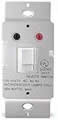 If you want to use a light that is controlled by a wall switch, you need to replace the wall switch with an X10 light switch. Actually it’s not a switch, it’s a button. This is so that when you turn the light off remotely, the switch isn’t still in the on position, and vice versa. The switch itself will contain installation instructions, but basically it will involve removing the switch plate, via the 2 or 4 screws holding it down, then removing the switch itself via another 2 screws, then unhooking the wires from that switch and hooking them to the new X10 switch.
IT IS VERY IMPORTANT THAT BEFORE YOU DO ANY OF THIS THAT YOU TURN OFF THE CIRCUIT BREAKER THAT RUNS THAT LIGHT. Test the light after you have turned it off to make sure it doesn’t work. This will protect you from electrocution. Before you put the switch plate back on, note the where the X10 channel dials are set, and change them if you wish. If you want 2 devices to operate independently, you need to assign them to different channels. They will still respond together to the “All lights on” and “All lights off” commands. When you are done with the installation, you can turn the breaker back on.
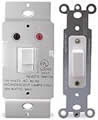 This is a little bit more complicated if you have a light that is controlled by more than one switch (for example, on opposite sides of the room). In this case you need to get a 3-way X10 switch, that comes with one main switch and one companion switch. There is an extra wire to hook up on a 3-way switch, but the instructions outline how to do this. For a light controlled by 3 wall switches, you need a 3-way switch plus an extra companion switch.
On a side note, we have also found this system is very useful for turning off the lights in our basement (where my office is) when our children leave them on. It saves us a trip down the stairs at the end of the day (since we often don’t notice until the upstairs lights are turned off). We have since replaced all of our basement switches with X10 switches. Another added benefit of this is that I can now control the lights with my universal remote and dim or brighten them from the couch in front of our entertainment center. More on this later (in this article).
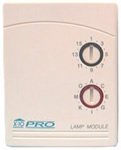 If you are using a light that is plugged into an outlet instead of a wall-switch-operated light, you have a couple options. First, you can replace the receptacle with an X10 receptacle, similar to how you would replace the wall switch (AGAIN TURN OFF THE BREAKER FIRST). Or if you want more flexibility in which outlet you choose, or don’t want the re-wiring hassle, you can buy an X10 lamp module, which plugs into a normal outlet, and has an outlet on the bottom which responds to the X10 commands. Then you simply plug your light or other signal device into this outlet, and you are ready to go.
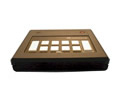 Once your light is in place and X10-ready, all you have to do is plug in the X10 console wherever you are going to be, and press the “all lights off” button. Please keep in mind that it is important to turn the lights back on for whoever you are signaling. Otherwise you may be responsible for some unfortunate accidents that may occur in the darkness. A simple flash or two should suffice.
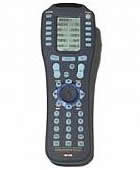 There you have it – at least the simple version, for around $50. I mentioned an optional remote control. That is actually the main way we control our lights at my house. I put the console by our entertainment center. It has a built in infrared receiver, though it doesn’t come with a remote. However, the universal remote control that we purchased (Home Theater Master MX-500) has the codes for that console pre-programmed into it. When we are upstairs, we use infrared extenders to transmit the signal to the console. I also programmed a macro button on the remote to automatically flash the lights off and on 3 times.
So all my wife has to do to signal me is point the remote at one of 4 the IR extenders we have in the upper level of our house and press the macro button. I typically pop up about 30 seconds later and ask her what she needs. And life goes on happily for us, as I can respond to situations before they escalate into disasters.


on August 10th, 2007 at 1:14 pm
Very useful and informative blog. Recommended for all to see.
http://medsdrugs.blogspot.com/
on August 12th, 2007 at 10:52 am
Latin Gay Double Penetrated On Beach
on August 20th, 2007 at 5:21 pm
Hello! Help solve the problem.
Very often try to enter the site, but says that the password is not correct.
Regrettably use of remembering. Give like to be?
Thank you!
on September 5th, 2007 at 9:19 am
hello , my name is Richard and I know you get a lot of spammy comments ,
I can help you with this problem . I know a lot of spammers and I will ask them not to post on your site. It will reduce the volume of spam by 30-50% .In return Id like to ask you to put a link to my site on the index page of your site. The link will be small and your visitors will hardly notice it , its just done for higher rankings in search engines. Contact me icq 454528835 or write me tedirectory(at)yahoo.com , i will give you my site url and you will give me yours if you are interested. thank you
on September 12th, 2007 at 8:23 am
Hi everyone
Check out Best Naughty Video :
http://www.youtube.com/watch?v=Z7jUnptjqZE
Bye to everyone!
maik midlooks
on October 4th, 2007 at 4:21 pm
I’ve got an Amazon gift certificate burning holes in my pocket,
and I want to get the most bang for my buck.
Enter the Secret Amazon Web Pages:
http://tinyurl.com/38sojf
This is where you’re going to find the “latest sales, rebates, and limited-time offers” from
Amazon, and you can score some pretty deep discounts if you’re a savvy shopper.
Next, there’s the special Sale link. This is open every Friday, and ONLY on Fridays.
You can find the same good discounts here as you would in hidden Deals, although some
Fridays you can really get lucky and make off like an Amazon bandit - I’ve seen discounts
there as low as 75% off sticker price.
on October 5th, 2007 at 12:58 pm
There’s one special secret Sale link on Amazon:
http://tinyurl.com/2r7ldr
[b]This is open every Friday and ONLY on Fridays! [/b]
You can find very good discounts here, although some Fridays you can really get
lucky and make off like an Amazon bandit - I´ve seen discounts there as low as 75%
off sticker Price.
on October 12th, 2007 at 8:35 am
Free Sex Movies & Porn Pictures Galleries
Welcome to free porn house, featuring the largest online collection of free hardcore porn galleries in all niches you can imagine.
URL: http://porno-house.net
——-
Keywords:
brunette teen porn
very young teen porn
free trial porn
free black teen porn
free young porn